LDAP
About
This feature allows synchronization of GAL items into LDAP.
When a public folder GAL is edited (adding members, changing access rights), all changes are sent into LDAP. This enables those who do not use MS Outlook or IceWarp WebClient to search within a company account structure.
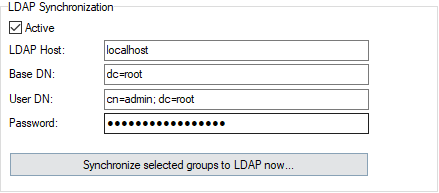
Figure. On-server Setup.
| Field |
Description |
|---|---|
|
Active |
Check this option to enable LDAP synchronization. |
|
LDAP Host |
Enter the hostname of your LDAP server. Note: You can force secure communication with the LDAP server by specifying ldaps://<your_ldap_server> Example: ldaps://ldap.icewarp.com or ldaps://182.164.6.24 Port is switched automatically to 636 when ldaps:// is used. However, this port can be overridden, if it is specified. |
|
Base DN |
Enter the Base DN of your LDAP server. |
|
User DN |
Enter the User DN for your LDAP server. DN stands for Distinguished Name. Hence User DN is identifier of a user with sufficient rights to add exported data to LDAP directory. |
|
Password |
Enter the password for the specified User DN. |
|
Synchronize Specific Groups to LDAP Now ... |
Click this button to synchronize selected groups to LDAP. |

